---
title: Rock to eSPACE for FACILITeSPACE Integrations
description: How to set up the Rock RMS integration with eSPACE to automatically sync approved events and schedule HVAC, door access, and digital signage through COOLSPACE, SECURESPACE, and INFOSPACE using a one-way continuous sync.
---
[Skip to content](https://support.espace.cool/espace-knowledge-base/rock-to-espace-for-facilitespace-integrations#main-content)
English
Show submenu for translations
[](https://www.smartchurchsolutions.com/)
- [Knowledge Base](https://support.espace.cool/espace-knowledge-base)
- [Product Feedback](https://u03m6.share.hsforms.com/2EgdDdILgTLGc3McfPhw1uw)
Open main navigation
Close main navigation
- [Knowledge Base](https://support.espace.cool/espace-knowledge-base)
- [Product Feedback](https://u03m6.share.hsforms.com/2EgdDdILgTLGc3McfPhw1uw)
- English
Show submenu for translations
eSPACE Support Center: How can we help you?
- There are no suggestions because the search field is empty.
1. [eSPACE Knowledge Base](https://support.espace.cool/espace-knowledge-base?hsLang=en)
2. [Integrations](https://support.espace.cool/espace-knowledge-base/integrations?hsLang=en)
3. [ChMS to eSPACE for Integration Scheduling](https://support.espace.cool/espace-knowledge-base/integrations?hsLang=en#chms-to-espace-for-integration-scheduling)
# Rock to eSPACE for FACILITeSPACE Integrations
## How to sync your Rock events to eSPACE
### **Rock RMS and eSPACE Integration**
This integration was designed by both companies so that you can continue to use Rock RMS to enter and manage all your events and then have eSPACE “pull” your approved events over in order to take advantage of our HVAC, doors, and digital signage integrations. This means as events are approved in Rock RMS, your HVAC, doors and/or digital signage displays can automatically be scheduled for events!
- Please search and read the specific articles to learn more about the HVAC, door, and digital signage integrations that we offer.
- Before adding to your existing eSPACE subscription, we would love to have a one-on-one live demo with you:[**Schedule a Demo to Add to your Subscription**](https://meetings.hubspot.com/casie-hildner/espace-customer-consultation-)
- If you are not yet an eSPACE customer, we encourage you to schedule a demo with our sales experts\
- **Different eSPACE Subscription Tiers include Different Features, Including Integrations**
- In order to know if this feature is included in your eSPACE subscription tier, please contact support@espace.cool or ask during your demo.
- **Viewing Your Subscription Details**
- Each eSPACE admin with access to Billing can view what subscription tier your organization currently has and everything that is included in their account under Settings \> Other \> Billing \> Manage.
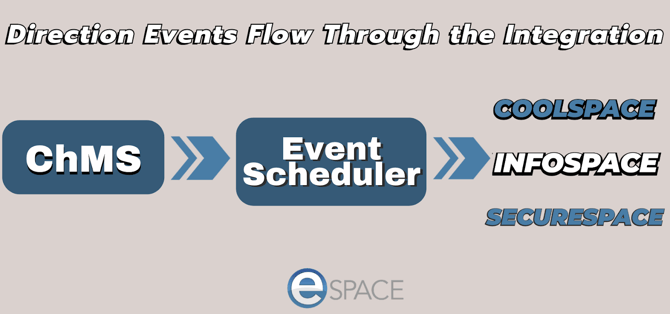
- Please know that all of these are a 1-way sync to eSPACE *(not from)* and because of their purpose, the integration is specifically designed to continuously sync every few minutes and to only bring over the space names and a few days of events at a time with minimal information so that FACILITeSPACE knows which thermostat/HVAC unit, door or digital signage display to update.
- Once the data syncs to eSPACE, no changes should be made in eSPACE. For simplicity’s sake and to ensure that the integration works, ALL changes should ONLY be made in Rock system.
#### **Part 1: Set Up Rock RMS Events to Integrate with eSPACE**
**1. Email support@espace.cool** and let them know that you are ready for them to configure your account on the back end to integrate with Rock RMS.
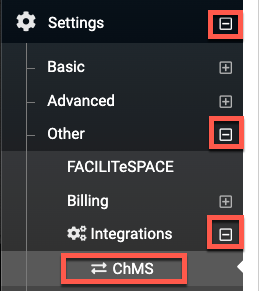
**2.** Navigate to Setting \> Other \> Integrations \> ChMS.
****
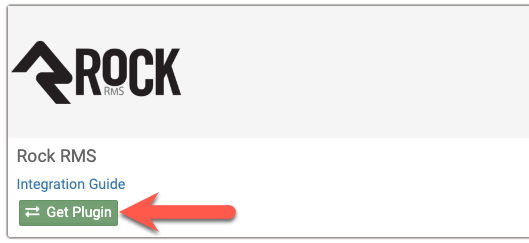
**3.** Click "Get Plugin" and enter your Rock RMS credentials and save.
#### **See your Events in eSPACE**
**4.** 15 minutes after that, eSPACE will start polling the Rock RMS API every 15 minutes to pull in your approved events for the next few days. eSPACE will also sync over your rooms which you will see in your eSPACE account under Settings/Basic/Spaces.

#### **Part 2: Setup the Events in eSPACE to Schedule your HVAC, Doors, and Digital Signage**
**5.** To then set up your eSPACE FACILITeSPACE account to schedule your HVAC, doors or digital signage, make sure you also have COOLSPACE, SECURESPACE and/or INFOSPACE added to your eSPACE subscription.
**6.** Once you do, then click My Modules (at the top right) and select FACILITeSPACE. 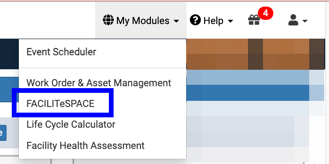
**7.** Then click on either HVAC and choose your type, Digital Signage and start creating displays, or click on Access Control and choose your door type.
- - Please see our articles about the specific HVAC, door, and digital signage integrations that we offer for more detail.
**For eSPACE Work Order & Asset Management only customers, learn more about our product Event Scheduler, by clicking "**[**Learn More**](https://www.espace.cool/wp-content/uploads/2017/11/ChMS-INTEGRATION-DATA-SHEET-No-Pricing.pdf)**".**
[](https://www.smartchurchsolutions.com/learn-more/)
- [Event Scheduler](https://support.espace.cool/espace-knowledge-base/event-scheduler?hsLang=en#main-content)
- [Calendar of Events](https://support.espace.cool/espace-knowledge-base/event-scheduler?hsLang=en#calendar-of-events)
- [Items](https://support.espace.cool/espace-knowledge-base/event-scheduler?hsLang=en#items)
- [Event Creation](https://support.espace.cool/espace-knowledge-base/event-scheduler?hsLang=en#event-creation)
- [Basic Settings](https://support.espace.cool/espace-knowledge-base/event-scheduler?hsLang=en#basic-settings)
- [Advanced Settings](https://support.espace.cool/espace-knowledge-base/event-scheduler?hsLang=en#advanced-settings)
- [Other Integrations: SSO, Google, Outlook, APIv2](https://support.espace.cool/espace-knowledge-base/event-scheduler?hsLang=en#other-integrations-sso-google-outlook-apiv2)
- [Billing & Invoicing](https://support.espace.cool/espace-knowledge-base/event-scheduler?hsLang=en#billing-invoicing)
- [Event Notifications](https://support.espace.cool/espace-knowledge-base/event-scheduler?hsLang=en#event-notifications)
- [Event Approval Process](https://support.espace.cool/espace-knowledge-base/event-scheduler?hsLang=en#event-approval-process)
- [General Features for All Users](https://support.espace.cool/espace-knowledge-base/event-scheduler?hsLang=en#general-features-for-all-users)
- [eSPACE Events to ChMS Integrations](https://support.espace.cool/espace-knowledge-base/event-scheduler?hsLang=en#espace-events-to-chms-integrations)
- [Report Options](https://support.espace.cool/espace-knowledge-base/event-scheduler?hsLang=en#report-options)
- [Overview Articles](https://support.espace.cool/espace-knowledge-base/event-scheduler?hsLang=en#overview-articles)
- [Mobile App (Android & iPhone)](https://support.espace.cool/espace-knowledge-base/event-scheduler?hsLang=en#mobile-app-android-iphone)
- [Bundled Customers](https://support.espace.cool/espace-knowledge-base/event-scheduler?hsLang=en#bundled-customers)
- [Work Order & Asset Management](https://support.espace.cool/espace-knowledge-base/work-order-asset-management?hsLang=en#main-content)
- [Creating Work Orders](https://support.espace.cool/espace-knowledge-base/work-order-asset-management?hsLang=en#creating-work-orders)
- [Vehicle Pro](https://support.espace.cool/espace-knowledge-base/work-order-asset-management?hsLang=en#vehicle-pro)
- [Asset Pro](https://support.espace.cool/espace-knowledge-base/work-order-asset-management?hsLang=en#asset-pro)
- [Basic Settings](https://support.espace.cool/espace-knowledge-base/work-order-asset-management?hsLang=en#basic-settings)
- [Advanced Settings](https://support.espace.cool/espace-knowledge-base/work-order-asset-management?hsLang=en#advanced-settings)
- [Preventative Maintenance \[PM\]](https://support.espace.cool/espace-knowledge-base/work-order-asset-management?hsLang=en#preventative-maintenance-pm)
- [General Features for All Users](https://support.espace.cool/espace-knowledge-base/work-order-asset-management?hsLang=en#general-features-for-all-users)
- [Analytics & Reports](https://support.espace.cool/espace-knowledge-base/work-order-asset-management?hsLang=en#analytics-reports)
- [Dashboards Views for Different User Levels](https://support.espace.cool/espace-knowledge-base/work-order-asset-management?hsLang=en#dashboards-views-for-different-user-levels)
- [Mobile App (Android & iPhone)](https://support.espace.cool/espace-knowledge-base/work-order-asset-management?hsLang=en#mobile-app-android-iphone)
- [Reviewing, Assigning & Approving Work Orders](https://support.espace.cool/espace-knowledge-base/work-order-asset-management?hsLang=en#reviewing-assigning-approving-work-orders)
- [Overview Articles](https://support.espace.cool/espace-knowledge-base/work-order-asset-management?hsLang=en#overview-articles)
- [Work Order & Event Scheduler Integration](https://support.espace.cool/espace-knowledge-base/work-order-asset-management?hsLang=en#work-order-event-scheduler-integration)
- [Integrations](https://support.espace.cool/espace-knowledge-base/integrations?hsLang=en#main-content)
- [HVAC](https://support.espace.cool/espace-knowledge-base/integrations?hsLang=en#hvac)
- [Doors](https://support.espace.cool/espace-knowledge-base/integrations?hsLang=en#doors)
- [Digital Signage](https://support.espace.cool/espace-knowledge-base/integrations?hsLang=en#digital-signage)
- [ChMS to eSPACE for Integration Scheduling](https://support.espace.cool/espace-knowledge-base/integrations?hsLang=en#chms-to-espace-for-integration-scheduling)
- [Floor Plan](https://support.espace.cool/espace-knowledge-base/floor-plan?hsLang=en)
- [General](https://support.espace.cool/espace-knowledge-base/general?hsLang=en)
- [All Users](https://support.espace.cool/espace-knowledge-base/all-users?hsLang=en#main-content)
- [General Usage](https://support.espace.cool/espace-knowledge-base/all-users?hsLang=en#general-usage)
- [Life Cycle Calculator](https://support.espace.cool/espace-knowledge-base/life-cycle-calculator?hsLang=en)
- [Operational Cost Tracker](https://support.espace.cool/espace-knowledge-base/operational-cost-tracker?hsLang=en)
- [File a Support Ticket](https://support.espace.cool/tickets-view/new)
[](https://www.smartchurchsolutions.com/)
Copyright © 2026, Smart Church Solutions