
- Please read our terms and conditions concerning refunds.
How do I cancel the HVAC Integration
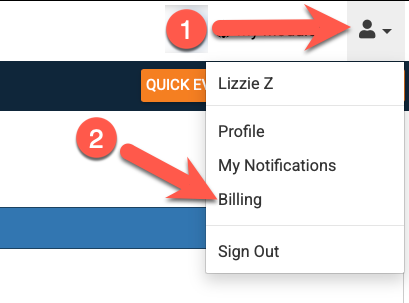
To cancel, an Admin User (who is also a Billing Contact) can go to the person icon in the top right corner and choose Billing
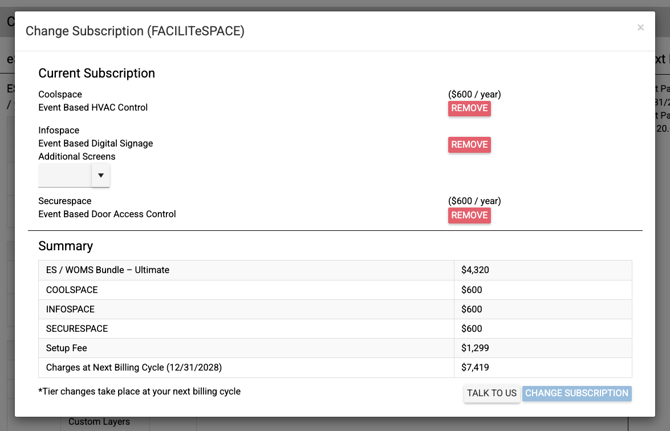
Then, once on the Billing Page/Manage page, select "FACILITeSPACE" from the Remove Feature drop down menu. In the pop up menu choose "Remove" for COOLSPACE and then click "Change Subscription".
- Please read the terms and conditions about our no refund policy.
- Any change for a removal will result in a pending change on the account which will then go into affect on the new renewal of your eSPACE subscription.
Consequences of removing the HVAC portion or canceling the subscription
Reprogramming your HVAC System:
- Once your COOLSPACE account is deactivated, your HVAC will no longer get commands from eSPACE.
- Depending on your system, this may mean that you'll need to manually enter your schedule in your HVAC System's Software or thermostats.
- We recommend working with your HVAC controls company (MRG, Trane, etc.) to determine any further steps required to operate your equipment after you remove the eSPACE integration.
- Your HVAC units may not run properly until the above is done.
Re-adding the HVAC integration or re subscribing to eSPACE
- There is a Setup Fee for re-adding the HVAC integration on your eSPACE account:
We require a setup fee to re-add the HVAC integration to your eSPACE subscription because there are some manual reconfigurations we need to do in our system.
- If you do not plan to reactivate or re-add the HVAC integration to your eSPACE subscription, your IT team may want to close any firewall ports that were opened to allow the HVAC integration to communicate with your HVAC systems.