
Life Cycle Calculator is a component of Event Scheduler or Work Order Management modules, depending on your subscription tier. We no longer offer a stand alone subscription to the Life Cycle Calculator.
-
In order to know if this feature is included in your eSPACE subscription tier, please contact support@espace.cool.
Viewing Your Subscription Details
- Each eSPACE admin with access to Billing can view what subscription tier your organization currently has and everything that is included in their account under Settings > Other > Billing > Manage.
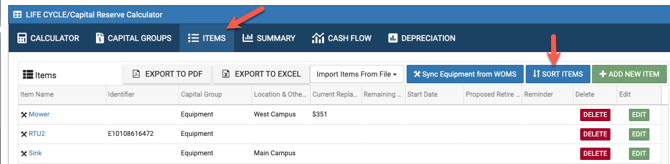
You can easily sort your items by taking the following steps:
Select the "Items" tab
Select the blue "Sort Items" button
A new page will open where you can sort your items the way you want. Simply drag and drop the items in your desired order.
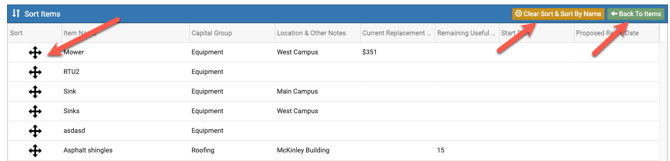
- Should you decide to put your items back in alpha name order, you can select the "Clear Sort & Sort by Name" button, highlighted in gold.
- To get back to your items, click on the "Back to Items" button, highlighted in green.