
If some of your thermostats are set to change temperatures when the motion sensor detects someone's presence and you want to make changes, you can!
You can make changes to your thermostat settings by doing the following:
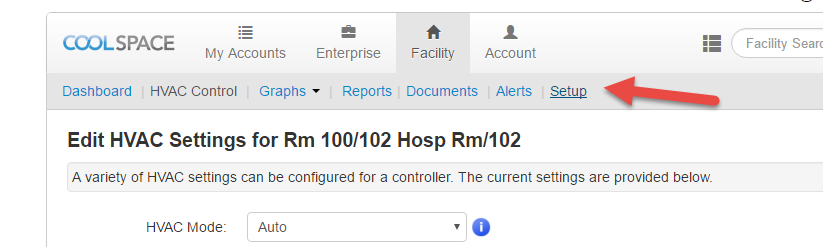
1. First Click Setup
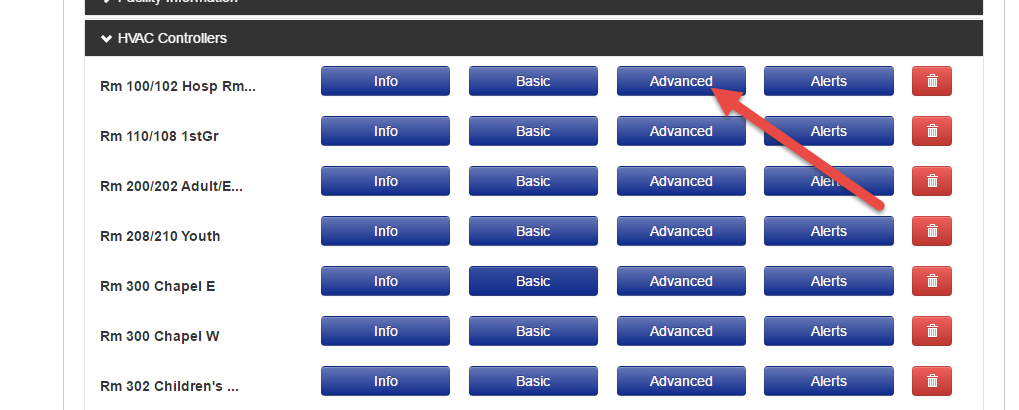
2. Then click "Advanced" on any of your controllers (STATS)
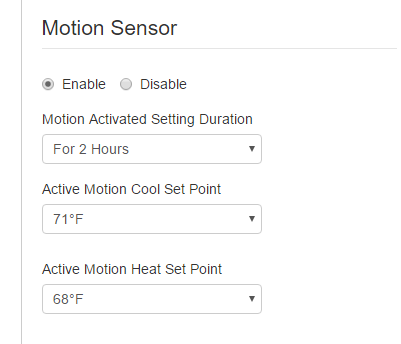
3. At the bottom you will see the motion sensor settings, where you can make your changes
Support Contacts
For any questions about settings in your eSPACE Event Scheduler or FACILITeSPACE module, setting up the integration so your eSPACE account connects to your EnTOUCH thermostat or questions about verifying if eSPACE is sending schedules to your thermostats, please contact support@smartchurchsolutions.com
- You can also see the API calls that eSPACE is sending to your EnTOUCH thermostats in your FACILITeSPACE account when you expand Integrations > EnTOUCH and choose the History tab.
For any questions about the thermostats themselves, troubleshooting why the thermostats aren’t following the schedules sent from eSPACE in the API, connecting to WiFi, programming thermostats based on equipment needs, or switching the main admin on the account, please contact Jeff.King@entouchcontrols.com or support@entouchcontrols.com or info@entouchcontrols.com or call 864-350-1980 or 1-877-755-1609.