*This integration is separate from the integration with a Niagara or Honeywell JACE. Please read our Knowledge Base article “COOLSPACE: JACE Integration Overview ” for more.*
For over 10 years we have been successfully integrating schedules from events in eSPACE with automated building control systems that speak BACnet. This integration is made possible by our partnership with North Building Technologies who worked with us to modify their ObSys software to pull the schedules from eSPACE, convert them into BACnet discoverable points so that the units on the BACnet system can be programmed to pull those schedules in.
Initial Steps
-
Make sure your HVAC controls are compatible
- Purchase a North ObSys dongle & license , which connects your eSPACE account to your BACnet system
- Make sure your controls programmer understands what they will need to program
- Schedule a Demo to Add to your Subscription
- Schedule a Demo with Sales for new Subscriptions
Total Integration Cost
It’s also important to understand the additional cost that is specific to this integration, which sales will go over in their meeting with you.
- COOLSPACE /HVAC subscription cost
- One time set up fee for configuring your account for a BACnet integration
- Cost of the North ObSys license/program
- Other possible costs could include programming by your controls contractor
Programming the Integration
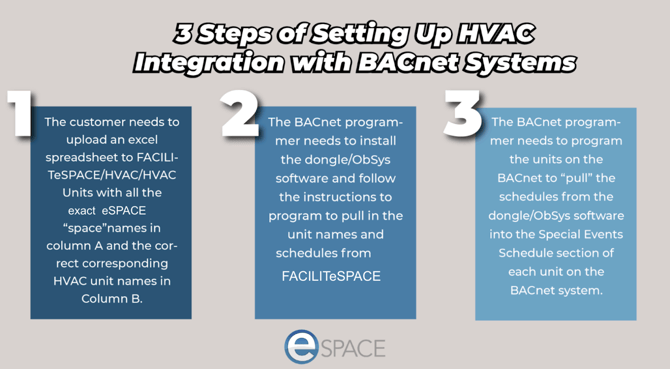
Once you have confirmed that your system is compatible and you understand the full cost that is involved, you will be ready to set up the integration. Below are the 3 main steps of setting up the integration.
- Once the integration is set up, events must be fully approved with a start time in the future in order for eSPACE to schedule them.
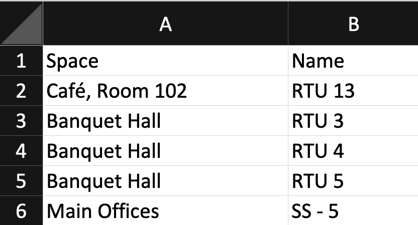
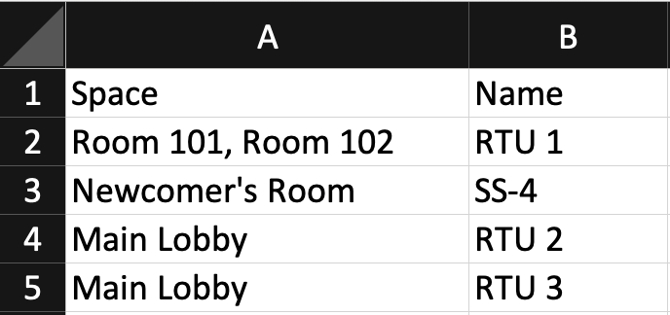
- Here is an example of the format for the Excel spreadsheet in order to upload the list of HVAC unit names and spaces. Column A’s header must be “Space and column B’s header must be “Name”.
Step One: Switching to the FACILITeSPACE Module
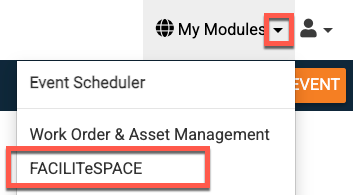
1. Once you are ready to complete step one of the integration, log into your eSPACE account and click on "My Modules" at the top right and select FACILITeSPACE.
- Only the admin with billing access who initially added COOLSPACE to the subscription will be granted immediate access to the Building Automations, but they can give access to other admins.
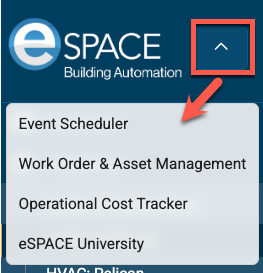
- Once in the FACILITESPACE module, you can switch back to another module by clicking on the arrow next to the eSPACE logo and selecting a different module.
2. For the Excel spreadsheet, the header for column A must be "Space" and the column header for B must be "Name" in order for the HVAC units and spaces assigned to be uploaded into the customer's FACILITeSPACE account.
- While there can only be one HVAC unit name per row, you can place as many space names (separated by a comma) as needed on each row in order to properly assign all the HVAC units the right spaces.
- The space names in the Excel need to EXACTLY match the space names in your Event Scheduler account.
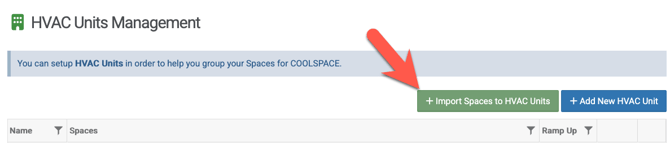
3. To import the completed spreadsheet, switch to the FACILITeSPACE module, click on Integrations in the left side menu to expand it and then choose the JACE/BACnet option.
Then on that page, click "Import Spaces to HVAC Units" and follow the steps to upload the Excel.
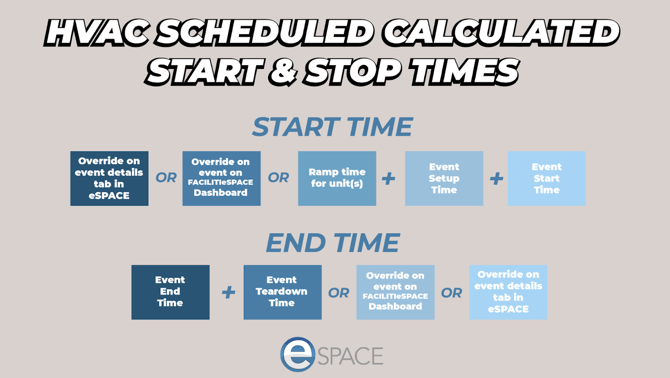
4. Once all your HVAC units and spaces are imported, you will see them on the main page. You can then click "Edit" on any of them and add ramp time (the time that the HVAC schedule will start before either the set up time on the event or if there is no set up it will be the time before the start time of the event). 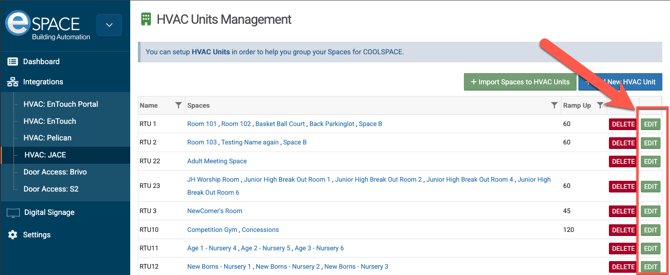
North ObSys Programming Instructions
If needed, please contact support@espace.cool to get a copy of the full programming instructions for the North ObSys software.
Integration Design
The COOLSPACE integration for systems that speak BACnet is intended to be a way for HVAC units to get automatically scheduled based on fully approved events in Event Scheduler. Whether you are also integrating eSPACE with another ChMS or using eSPACE- Event Scheduler as your ChMS, once the events are approved, then our eSPACE- FACILITeSPACE module will make those schedules available in an ICS feed for the North ObSys software to pull in, convert into BACnet discoverable points, and be available for the units on the BACnet system to pull in from the North ObSys software.
In our FACILITeSPACE module, once you upload your list of HVAC units and assigned spaces, you have the ability to create custom ramp times for each unit so that the spaces reach occupied setpoints before the event setup time.
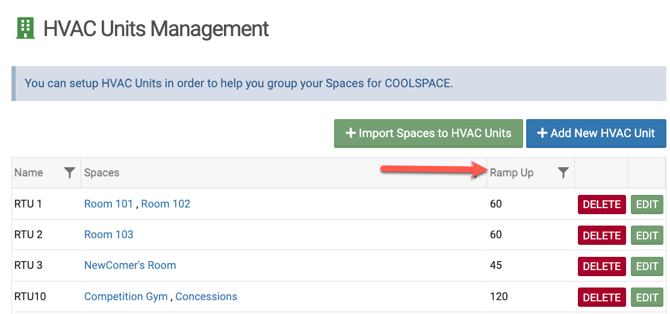
In order for the right HVAC units to be scheduled automatically by the events, all the names of the HVAC units need to be uploaded into the customer’s FACILITeSPACE account and assigned the correct corresponding spaces. See step 1 of Programming the Integration above for more.
There are no limits to how you can assign spaces and HVAC units, whether you need to assign multiple spaces to the same unit or assign multiple units to the same space.
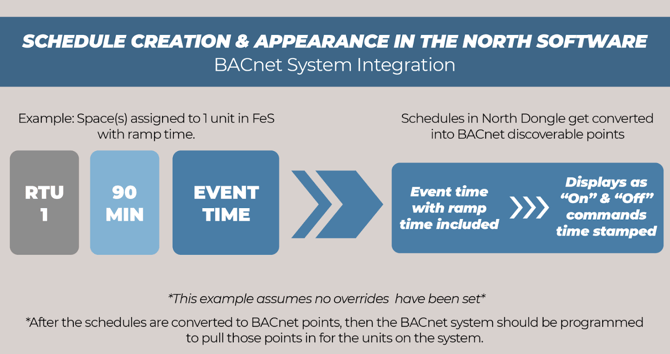
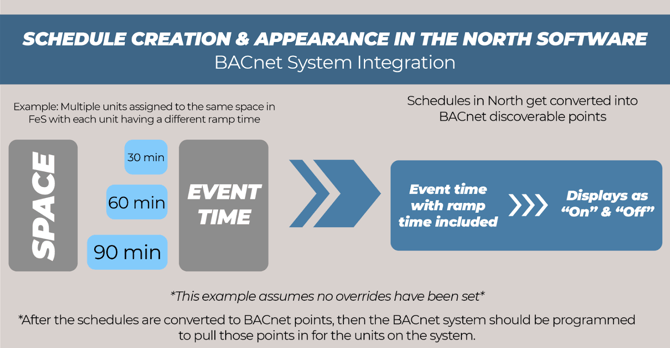
HVAC Schedule Calculation
Because of the way that eSPACE is designed to calculate the schedules specifically for the HVAC units, all events either in your ChMS system that is integrated with eSPACE- Event Scheduler OR the events that customers enter into eSPACE- Event Scheduler should be fully approved at least 15 min before the calculated start time.
Confirming Schedules
There are 3 basic steps that are important to know if you ever need to confirm that the integration is working.
- Confirm that the events are in the ICS feed from eSPACE
- To do so, in your Event Schedule account, navigate to Settings > Advanced > General > API Settings > Data Feed.
- Confirm that the schedules are in the North ObSys software.
- To do so, follow the instructions in the North Integration document.
- Confirm that the “on and off” BACnet points are in the unit’s Special Events schedule section for each unit on the BACnet system.
- Contact your BACnet system programmer for assistance.
Schedule Appearance in BACnet
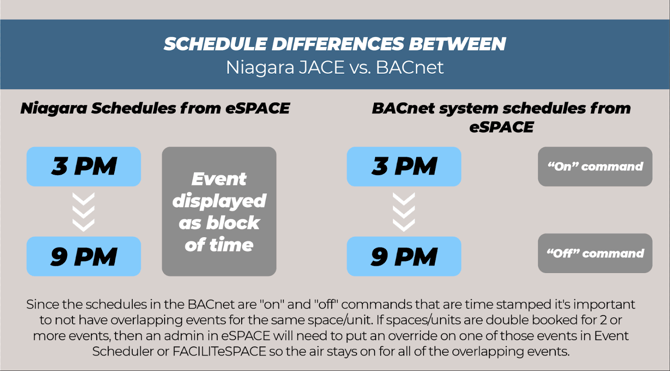
Please keep in mind that the “schedules” for events in your BACnet system will appear differently than “schedules” in a JACE (Niagara or Honeywell). See the visual below for comparison.