Customers using Event Scheduler have the ability to integrate their eSPACE account with certain third-party ChMS companies. This allows for all events to be created, edited, and deleted in eSPACE but then sync to one of the third-party ChMS companies that have built an integration to pull events from your Event Scheduler account into their system. Since these are third-party integrations, please contact your ChMS for all troubleshooting questions and support.
- Different eSPACE Subscription Tiers include Different Features Including Integrations with ChMS
- In order to know if this feature is included in your eSPACE subscription tier, please contact support@espace.cool.
- In order to know if this feature is included in your eSPACE subscription tier, please contact support@espace.cool.
- Viewing Your Subscription Details
- Each eSPACE admin with access to Billing can view what subscription tier your organization currently has and everything that is included in their account under Settings > Other > Billing > Manage.
- Please search and read the specific articles to learn more about the HVAC, door, and digital signage integrations that we offer.
Below are the third-party options:
- One Church
- Ministry Platform
- Church Teams
- Touchpoint
These third-party integrations are specifically designed to continuously sync every few minutes and to convert the event data in a way that is required for the other ChMS to display. Because of how often it syncs, it only brings over a few days of events at a time.
*Ministry Platform also requires a few extra fields to be filled out on events in eSPACE before it’s able to sync and events are only able to be synced by manually syncing them one by one to Ministry Platform with-in eSPACE on the Occurrence tab of an event.
Once the data syncs to the other ChMS, no changes should be made to the events within the ChMS. For simplicity’s sake and to ensure that the integration works, ALL changes should ONLY be made in your eSPACE for the events.
How to set up the integration in eSPACE
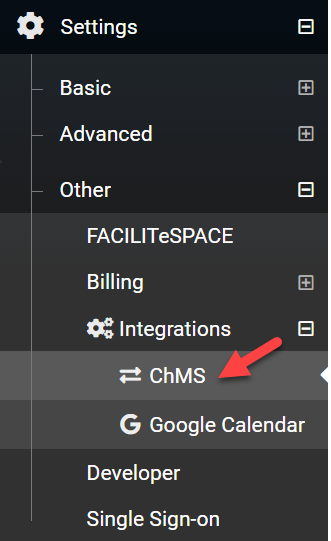
- If you are already an eSPACE subscriber (if not, please contact sales@smartchurcholutions.com) and have Event Scheduler on your subscription, then go to Settings > Other > ChMS.
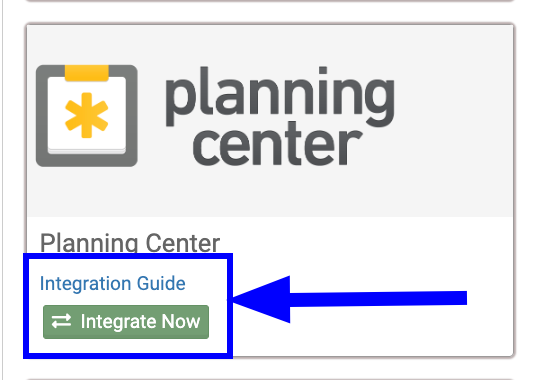
- Once on that page, click the Integration Guide for your specific ChMS to learn what you need to do to connect your eSPACE-Event Scheduler account to your ChMS account.
*Again, Ministry Platform also requires a few extra fields to be filled out on events in eSPACE before it’s able to sync and events are only able to be synced by manually syncing them one-by-one to Ministry Platform within eSPACE on the Occurrence tab of an event.
Support
For any questions regarding why certain fields do or do not sync or for any troubleshooting assistance, please contact your specific ChMS company for help.
- Different eSPACE Subscription Tiers include Different Features Including Integrations with ChMS
- In order to know if this feature is included in your eSPACE subscription tier, please contact support@espace.cool.
- In order to know if this feature is included in your eSPACE subscription tier, please contact support@espace.cool.
- Viewing Your Subscription Details