We’re excited to share that your account will now be serviced and supported directly by the original creators of the software platform - eSPACE. Previously offered under the FacilityONE brand, the platform is now moving fully to the eSPACE name. This means you'll start to see eSPACE branding throughout the application, in our communications, and in support resources.
We're here to make this a smooth and positive experience for you, and we appreciate your continued partnership! At eSPACE, we are passionate about partnering with our clients to assist in the stewarding of their facilities through our software and education.
Transition Point of Contact
During the transition period, you have been assigned to a special transition concierge - Rebecca Tarchala. She will be your point of contact for all things related to your transition. The best way to reach out is to email support@eSPACE.software and Rebecca will be able to provide guidance.
When support is needed, all internal software users will have the ability to access the blue ‘help’ icon located in the bottom left corner of your Dashboard. That is where you can create a support ticket, start a chat with a live person, review our Knowledge Base articles, and much more!
What You Need to Do
We’re here to make the transition as smooth as possible. In the coming days, please watch for communication from the eSPACE team with important details both in email and in-app messages.
To ensure uninterrupted access and support, you’ll need to complete a few quick steps:
- Save a new bookmark: app.espace.cool instead of events.facilityone.com
- If you are using Public Event Request Forms, you will need to update the links in any place where you previously shared the links
- Update any Public Calendar embed code that you previously created
- Update any Google Calendar links that you previously created by following the steps in the integration article linked here
- Sign a new service agreement at the time of renewal directly with eSPACE (Cool Solutions Group LLC dba eSPACE)
- If you are using the Event Scheduler module, please be aware that the event id #'s will change in the new environment. Nothing for you to do other than be aware of this update. You will still be able to find all events by searching the event name or clicking those events from the calendar or reports.
Where do I find my Public Event Request Form Links?
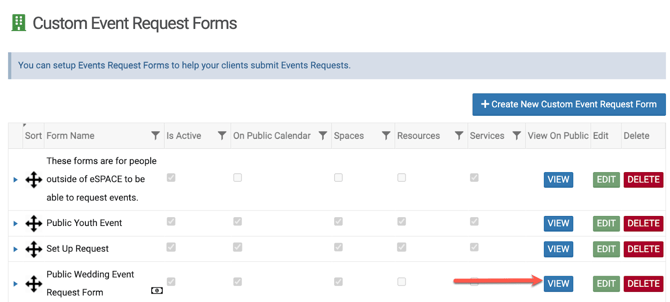
Once you are logged in at app.espace.cool, any Administrator can navigate to Settings>Advanced>Event Request Forms to find all of your previously built forms (we've moved them for you). Simply select the "view" button and the updated url can be found at the top of your browser window. Paste this for each form into any location you've already shared the link.
Where do I find my Public Calendar embed code?
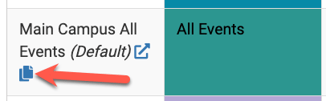
Once you are logged in at app.espace.cool, any Administrator can navigate to Settings>Advanced>Public Calendar to find all of your previously built public calendars (we've moved them for you). Simply select the "copy" button to copy the updated embed code to your clipboard. Copy this for each calendar into any location you've already shared the embed code.
Where do I find my Google Calendar Integration?
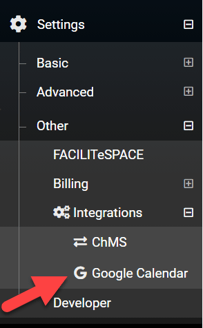
Once you are logged in at app.espace.cool, any Administrator can navigate to Settings>Other>Integrations/Google Calendar to find all of your previously linked Google calendars (we've moved them for you). You will need to remove existing credentials and recreate these links under the new app.espace.cool domain.