
Sections in this article:
- Before You Start
- Reminders for Contacts (Non-eSPACE People)
- Set a Reminder on an Event
- When Reminders Are Sent
- Who Gets Notified
- Reminder Email Example
- Confirm Reminders Were Sent
- Related Articles
Before You Start
- The event must be fully approved. Reminders are sent only for approved events.
- Turn on reminder emails. Each admin, sub-admin and user who wants reminder emails goes to their profile icon > My Notifications > Notification Preferences, turns on Event Reminders and clicks Save.

Reminders also show in the Reminders section of the left menu.

Reminders for Contacts (Non-eSPACE People)
Event contacts are usually people without an eSPACE login. For contacts to get an email when the event is approved and a reminder before it starts, an admin goes to Settings > Advanced > General > Email Notifications and turns on Send Event Approved Emails to Contact(s). Contacts get the reminder by email only.

Set a Reminder on an Event
- On the event's Details tab, scroll to the bottom and expand Optional Settings.
- Under Event Reminders, turn on who to remind:
- Event Owners: the person who created the event, unless ownership was transferred
- Admins: every admin in your account
- Sub-Admins: every sub-admin in your account
- Event Contacts: everyone on the event's Contacts tab, including non-eSPACE people
- Enter how many days before the event to send the reminder.
- Add Reminder Notes if you like. This box appears once you pick who to remind.


When Reminders Are Sent
Reminders go out once a day in the early morning (about 2–3 AM Eastern), one per occurrence.
Because of that, the earliest reminder you can schedule is for tomorrow. If the number of days you enter lands on today, no reminder is sent, since today's send time has already passed.

Who Gets Notified
|
Turned on for |
Left-menu Reminders notification |
|
|---|---|---|
|
Event Owners, Admins, Sub-Admins |
Yes |
Yes, if they turned on Event Reminders in Notification Preferences |
|
Event Contacts |
No, even if the contact has an eSPACE login |
Yes |
|
Someone who is both (for example owner and contact) |
Yes |
Yes, if they turned on Event Reminders in Notification Preferences |
Reminder Email Example
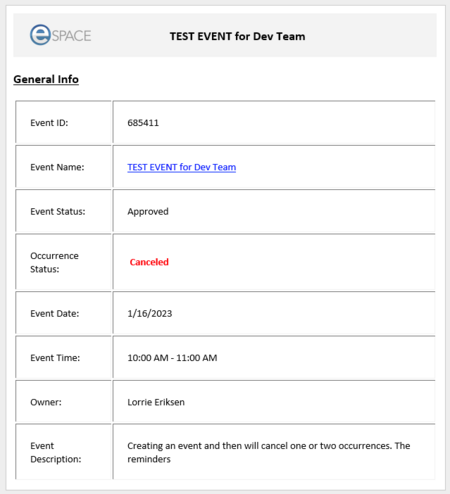
The reminder email shows the event's status and, for events with several occurrences, the status of that occurrence.
Confirm Reminders Were Sent
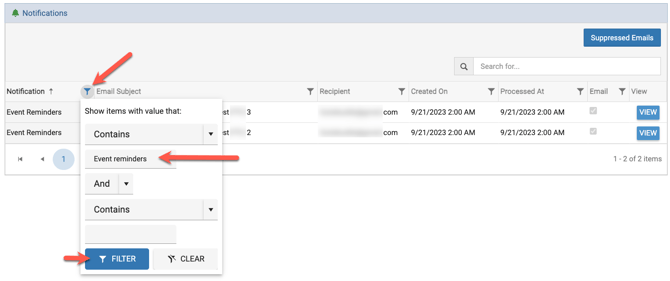
Go to Settings > Advanced > Notifications, filter the Notification column by Event Reminders and click Filter.
Related Articles