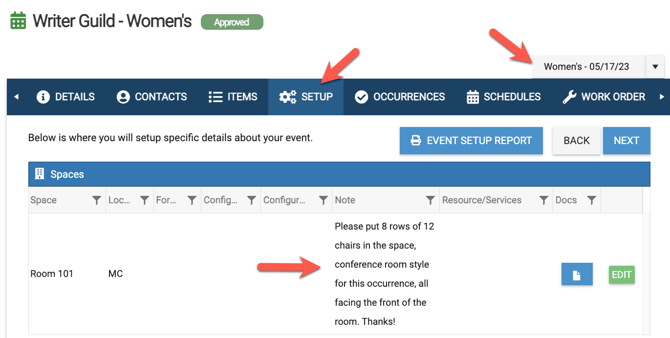
You can customize the names and descriptions of single occurrences within the same event! You can also customize the Setup tab, Items Tab, and Details tab in general and in a way where that the customized occurrence stands out on the event so that other users can easily see unique details for that occurrence. To do this, you must first separate that occurrence into its own schedule on the event by making it an overridden occurrence.
- Additional Learning:
- Open your event and navigate to the Occurrence tab
- Click to expand the occurrence to edit and select Edit Setup
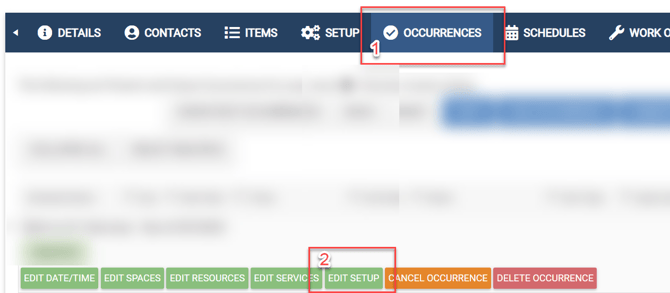
- Select the Setup tab of the occurrence click Override Setup.

This will result in an override occurrence and will create an override schedule on the event.
Once you have an override occurrence/schedule on the event, you will see a drop-down menu at the top right-hand side of the event. Based on which overridden/occurrence schedule you have selected, you will then be able to edit the Details tab (including the Schedule name which will change the name for that occurrence), the description, the Items Tab, and the Setup tab and those changes will only apply to the schedule selected in at the top right-hand side.
In order to change the name of the override occurrence/schedule,
- Select the override schedule from the top right drop-down menu
- Click on the main Details Tab
- Change the Schedule Name
- When you are ready, select the Update button to record your change
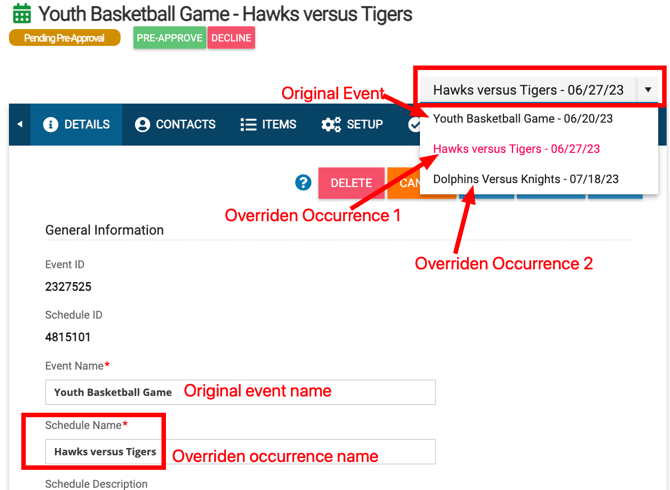
While on the Details tab for that overridden occurrence, you can make any other changes you want and it will only apply to that one overridden occurrence/schedule on the event.
If facilities need to easily see the setup details for one occurrence, then they can select that override occurrence/schedule in the drop-down menu at the top right and then navigate to the Setup tab.