Admins, within Settings > Advanced > General > Work Order Workflow, can enable "Automatically Complete Work Order Upon Completion of Final Task".

With this setting enabled, when a work order is requested and tasks are associated, once the final task within the work has been marked COMPLETE, the work order will automatically update to the "COMPLETED" status and be visible under the All Completed Work To Be Reviewed grid. Once the admin has reviewed the completed work order, they can update the status to "Closed", thus moving it from the dashboard.
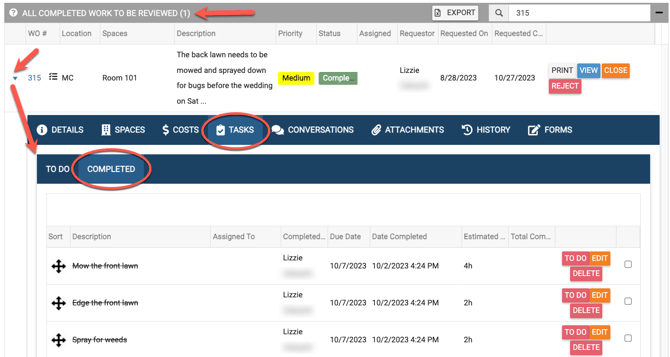
Also, the completed work order status will be reflected within the History tab of the work order.


Any Admin who has been given permissions for the Service Category and Location associated with the work order, can then choose the green Close button (see below) to close the completed work order.

Sub-Admin(s) who have been given permissions to close a work order and have permissions for the Service Category and Location associated to the work order can also close the completed work order.