---
title: Percentage Option for Discounts | Billing & Invoicing
description: How to add a percentage or flat discount to a Draft, Proposed, or Proposal Accepted invoice in eSPACE Billing and Invoicing, and where to view your subscription tier details.
---
[Skip to content](https://support.espace.cool/espace-knowledge-base/percentage-option-for-discounts-billing-invoicing#main-content)
English
Show submenu for translations
[](https://www.smartchurchsolutions.com/)
- [Knowledge Base](https://support.espace.cool/espace-knowledge-base)
- [Product Feedback](https://u03m6.share.hsforms.com/2EgdDdILgTLGc3McfPhw1uw)
Open main navigation
Close main navigation
- [Knowledge Base](https://support.espace.cool/espace-knowledge-base)
- [Product Feedback](https://u03m6.share.hsforms.com/2EgdDdILgTLGc3McfPhw1uw)
- English
Show submenu for translations
eSPACE Support Center: How can we help you?
- There are no suggestions because the search field is empty.
1. [eSPACE Knowledge Base](https://support.espace.cool/espace-knowledge-base?hsLang=en)
2. [Event Scheduler](https://support.espace.cool/espace-knowledge-base/event-scheduler?hsLang=en)
3. [Billing & Invoicing](https://support.espace.cool/espace-knowledge-base/event-scheduler?hsLang=en#billing-invoicing)
# Percentage Option for Discounts | Billing & Invoicing
## How to add a discount to an invoice in Event Scheduler
Billing & Invoicing is a great feature available on certain subscription tiers of Event Scheduler!
- **In order to know if this feature is included in your eSPACE subscription tier, please contact support@espace.cool.**
For those that are on an eSPACE subscription tier which includes Billing & Invoicing, You can add a discount to an invoice that is a "Draft" status, "Proposed" status, or "Proposal Accepted" status.
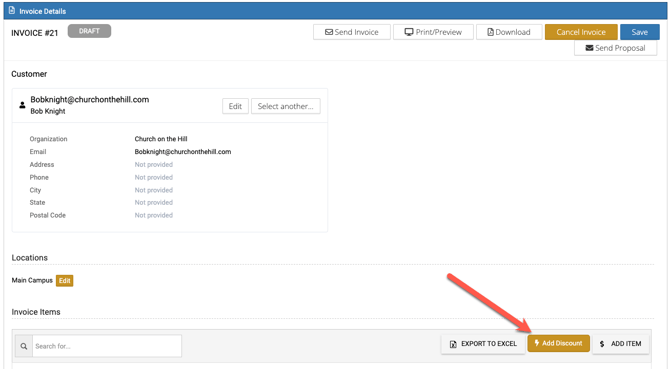
After clicking **Add Discount** on an invoice,
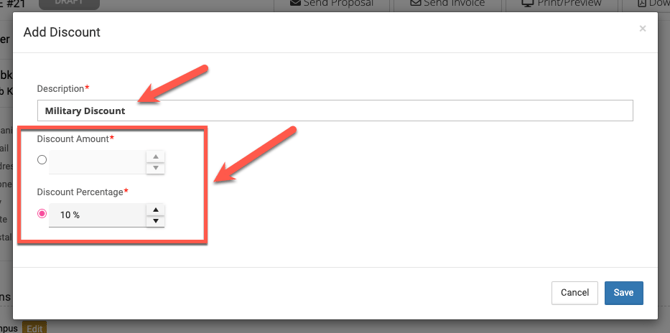
you have the option to choose a **percentage**:
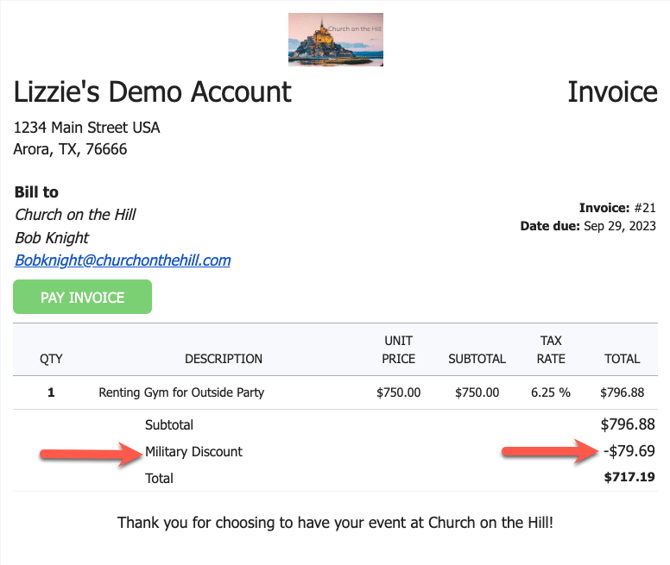
Now, that discount appears on the Invoice.
**Different eSPACE Subscription Tiers include Different Features**
- - In order to know if this feature is included in your eSPACE subscription tier, please contact support@espace.cool.
**Viewing Your Subscription Details**
- Each eSPACE admin with access to Billing can view what subscription tier your organization currently has and everything that is included in their account under Settings \> Other \> Billing \> Manage.
[](https://www.smartchurchsolutions.com/learn-more/)
- [Event Scheduler](https://support.espace.cool/espace-knowledge-base/event-scheduler?hsLang=en#main-content)
- [Calendar of Events](https://support.espace.cool/espace-knowledge-base/event-scheduler?hsLang=en#calendar-of-events)
- [Items](https://support.espace.cool/espace-knowledge-base/event-scheduler?hsLang=en#items)
- [Event Creation](https://support.espace.cool/espace-knowledge-base/event-scheduler?hsLang=en#event-creation)
- [Basic Settings](https://support.espace.cool/espace-knowledge-base/event-scheduler?hsLang=en#basic-settings)
- [Advanced Settings](https://support.espace.cool/espace-knowledge-base/event-scheduler?hsLang=en#advanced-settings)
- [Other Integrations: SSO, Google, Outlook, APIv2](https://support.espace.cool/espace-knowledge-base/event-scheduler?hsLang=en#other-integrations-sso-google-outlook-apiv2)
- [Billing & Invoicing](https://support.espace.cool/espace-knowledge-base/event-scheduler?hsLang=en#billing-invoicing)
- [Event Notifications](https://support.espace.cool/espace-knowledge-base/event-scheduler?hsLang=en#event-notifications)
- [Event Approval Process](https://support.espace.cool/espace-knowledge-base/event-scheduler?hsLang=en#event-approval-process)
- [General Features for All Users](https://support.espace.cool/espace-knowledge-base/event-scheduler?hsLang=en#general-features-for-all-users)
- [eSPACE Events to ChMS Integrations](https://support.espace.cool/espace-knowledge-base/event-scheduler?hsLang=en#espace-events-to-chms-integrations)
- [Report Options](https://support.espace.cool/espace-knowledge-base/event-scheduler?hsLang=en#report-options)
- [Overview Articles](https://support.espace.cool/espace-knowledge-base/event-scheduler?hsLang=en#overview-articles)
- [Mobile App (Android & iPhone)](https://support.espace.cool/espace-knowledge-base/event-scheduler?hsLang=en#mobile-app-android-iphone)
- [Bundled Customers](https://support.espace.cool/espace-knowledge-base/event-scheduler?hsLang=en#bundled-customers)
- [Work Order & Asset Management](https://support.espace.cool/espace-knowledge-base/work-order-asset-management?hsLang=en#main-content)
- [Creating Work Orders](https://support.espace.cool/espace-knowledge-base/work-order-asset-management?hsLang=en#creating-work-orders)
- [Vehicle Pro](https://support.espace.cool/espace-knowledge-base/work-order-asset-management?hsLang=en#vehicle-pro)
- [Asset Pro](https://support.espace.cool/espace-knowledge-base/work-order-asset-management?hsLang=en#asset-pro)
- [Basic Settings](https://support.espace.cool/espace-knowledge-base/work-order-asset-management?hsLang=en#basic-settings)
- [Advanced Settings](https://support.espace.cool/espace-knowledge-base/work-order-asset-management?hsLang=en#advanced-settings)
- [Preventative Maintenance \[PM\]](https://support.espace.cool/espace-knowledge-base/work-order-asset-management?hsLang=en#preventative-maintenance-pm)
- [General Features for All Users](https://support.espace.cool/espace-knowledge-base/work-order-asset-management?hsLang=en#general-features-for-all-users)
- [Analytics & Reports](https://support.espace.cool/espace-knowledge-base/work-order-asset-management?hsLang=en#analytics-reports)
- [Dashboards Views for Different User Levels](https://support.espace.cool/espace-knowledge-base/work-order-asset-management?hsLang=en#dashboards-views-for-different-user-levels)
- [Mobile App (Android & iPhone)](https://support.espace.cool/espace-knowledge-base/work-order-asset-management?hsLang=en#mobile-app-android-iphone)
- [Reviewing, Assigning & Approving Work Orders](https://support.espace.cool/espace-knowledge-base/work-order-asset-management?hsLang=en#reviewing-assigning-approving-work-orders)
- [Overview Articles](https://support.espace.cool/espace-knowledge-base/work-order-asset-management?hsLang=en#overview-articles)
- [Work Order & Event Scheduler Integration](https://support.espace.cool/espace-knowledge-base/work-order-asset-management?hsLang=en#work-order-event-scheduler-integration)
- [Integrations](https://support.espace.cool/espace-knowledge-base/integrations?hsLang=en#main-content)
- [HVAC](https://support.espace.cool/espace-knowledge-base/integrations?hsLang=en#hvac)
- [Doors](https://support.espace.cool/espace-knowledge-base/integrations?hsLang=en#doors)
- [Digital Signage](https://support.espace.cool/espace-knowledge-base/integrations?hsLang=en#digital-signage)
- [ChMS to eSPACE for Integration Scheduling](https://support.espace.cool/espace-knowledge-base/integrations?hsLang=en#chms-to-espace-for-integration-scheduling)
- [Floor Plan](https://support.espace.cool/espace-knowledge-base/floor-plan?hsLang=en)
- [General](https://support.espace.cool/espace-knowledge-base/general?hsLang=en)
- [All Users](https://support.espace.cool/espace-knowledge-base/all-users?hsLang=en#main-content)
- [General Usage](https://support.espace.cool/espace-knowledge-base/all-users?hsLang=en#general-usage)
- [Life Cycle Calculator](https://support.espace.cool/espace-knowledge-base/life-cycle-calculator?hsLang=en)
- [Operational Cost Tracker](https://support.espace.cool/espace-knowledge-base/operational-cost-tracker?hsLang=en)
- [File a Support Ticket](https://support.espace.cool/tickets-view/new)
[](https://www.smartchurchsolutions.com/)
Copyright © 2026, Smart Church Solutions